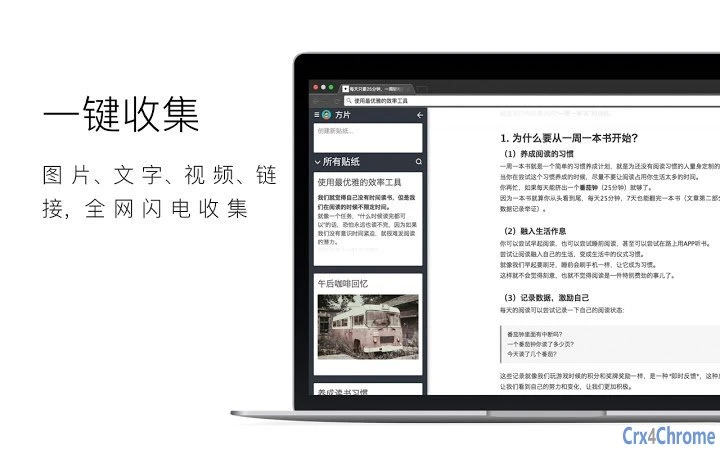

Effortless Web Clipping for Knowledge Management
Overview
方片收集 is a desktop application designed to streamline the process of capturing and organizing fragmented digital content. It enables users to collect text, images, URLs, and videos directly from web pages with minimal effort. The tool is particularly useful for individuals who rely on gathering information from various online sources—such as researchers, students, content creators, and professionals managing knowledge repositories.
By allowing one-click or drag-based collection, it reduces the friction between inspiration and documentation. The software supports cross-device access through cloud synchronization, ensuring that collected materials remain accessible from both desktop and mobile devices. This feature is especially beneficial for users who switch between work environments or prefer to review content on the go.
While the developer did not provide additional details about their background, the application’s focus on intuitive content capture suggests a user-centered design philosophy. Real-world usage scenarios include compiling research materials, archiving reference images, saving video clips for later review, and sharing curated content with collaborators. The tool aims to transform scattered web snippets into a structured, searchable knowledge base.
Key Features & Capabilities
- Image Collection via Drag-and-Drop: Users can collect images by dragging them to the left, with the option to download, share, or view the source URL.
- Text and Content Clipping: Select any portion of web content and drag it leftward to save it directly into the application’s workspace.
- Video Snippet Capture: A dedicated “方片 icon” on video players allows users to collect video content with a single click or drag, ideal for saving highlights or key moments.
- Seamless Cross-Device Sync: Collected data is stored in the cloud, enabling access from both desktop and mobile devices through a shared account.
- QR Code Transfer: Selected content can be converted into a QR code for instant transfer to a smartphone, facilitating quick on-the-go access.
- Collaborative Sharing: Users can share their collections with others, promoting knowledge exchange and teamwork.
These features are designed to enhance productivity by minimizing manual copy-paste workflows. For example, a student researching a topic can capture relevant paragraphs, images, and video excerpts in one session, then access them later on their phone during a commute. Similarly, a content creator can save visual references and video clips for future projects without losing track of sources.
The cloud-based architecture ensures that content remains available regardless of device changes or location shifts. While specific technical implementation details were not provided, the integration of drag-and-drop mechanics and QR-based transfer suggests a focus on simplicity and immediacy. The application’s ability to preserve context—such as original URLs and source metadata—adds value for users concerned with accuracy and traceability.
User Interface, Workflow & Performance
The user interface is structured around a clean, minimal layout focused on content capture and organization. Navigation is straightforward, with primary actions—such as collecting content and accessing saved items—placed within easy reach. The workflow is optimized for speed: selecting content and initiating a drag gesture triggers the capture process instantly.
This reduces cognitive load and supports rapid information ingestion. The application’s performance is expected to remain efficient given its lightweight footprint of 12.5 MB, though exact resource usage details were not specified. Stability during prolonged use was not documented, but the absence of reported issues in the release notes suggests a reliable baseline.
The developer did not provide performance benchmarks or CPU/RAM behavior metrics. Based on general software behavior patterns, the application likely operates smoothly on modern systems with standard web browsing activity. The integration with browser extensions may influence load times, but no performance degradation was noted.
Overall, the interface prioritizes usability, making it accessible even to users with limited technical experience.
Compatibility & System Requirements
方片收集 is compatible with both Windows and Mac operating systems, supporting a broad range of desktop environments. The software has a release version of 1.0.0 and requires 12.5 MB of installation space. While the developer did not specify exact system requirements, such as minimum RAM or processor speed, the lightweight nature of the application suggests it can run on systems with modest hardware specifications.
Platform compatibility information is limited to the two major desktop operating systems, with no mention of Linux or other alternatives. The application likely relies on standard web rendering engines and cloud connectivity for core functionality. Users should ensure their devices have a stable internet connection to enable cloud synchronization and QR code transfer features.
The absence of detailed hardware requirements means that installation and operation may vary depending on individual system configurations. For users seeking precise compatibility details, the developer may provide updated documentation in future releases.
Pros and Cons
Pros
- Lightweight design at just 12.5 MB
- Intuitive drag-and-drop interface for fast content capture
- Cloud sync enables access across PC and mobile devices
- Supports multiple content types: text, images, videos, and URLs
- QR code transfer simplifies content sharing between devices
- Free to download and use with no licensing restrictions
Cons
- Exact system requirements were not listed
- Performance details under heavy use were not provided
- Developer background and company information are limited
- No offline mode mentioned for content access
- Specific file format or export options were not specified
FAQ Section
Is 方片收集 available for Windows and Mac?
Yes, the software is compatible with both Windows and Mac operating systems.
Can I use 方片收集 without an internet connection?
The application requires an active internet connection for cloud synchronization and QR code transfer. Offline access capabilities were not specified.
Is the software free to download and use?
Yes, 方片收集 is available at no cost. There are no subscription fees or hidden charges.
How does the cloud sync work?
Collected content is stored in the cloud, allowing access from both desktop and mobile devices through a shared account. The synchronization process occurs automatically when connected.
What types of content can I collect?
You can collect text, images, URLs, and video snippets directly from web pages using drag-and-drop or the dedicated “方片 icon” on videos.
Final Thoughts + CTA
方片收集 stands out as a streamlined solution for individuals seeking to organize digital knowledge with minimal friction. Its core strength lies in the effortless capture of diverse web content—text, images, and videos—through intuitive gestures. The inclusion of cross-device access via cloud sync and QR-based transfer adds significant value for users who work across multiple platforms.
While specific technical details such as system requirements and performance under load are not available, the application’s lightweight size and user-focused design suggest broad accessibility. It is particularly well-suited for students, researchers, and creative professionals who regularly gather information from online sources. The free pricing model enhances its appeal, making it accessible to a wide audience.
For those looking to build a more organized digital workspace without complexity, 方片收集 delivers a compelling solution. Download 方片收集 now.







